
Download MiNews – Free RSS News Aggregator for Windows, macOS, Android & iOS
Overview of MiNews
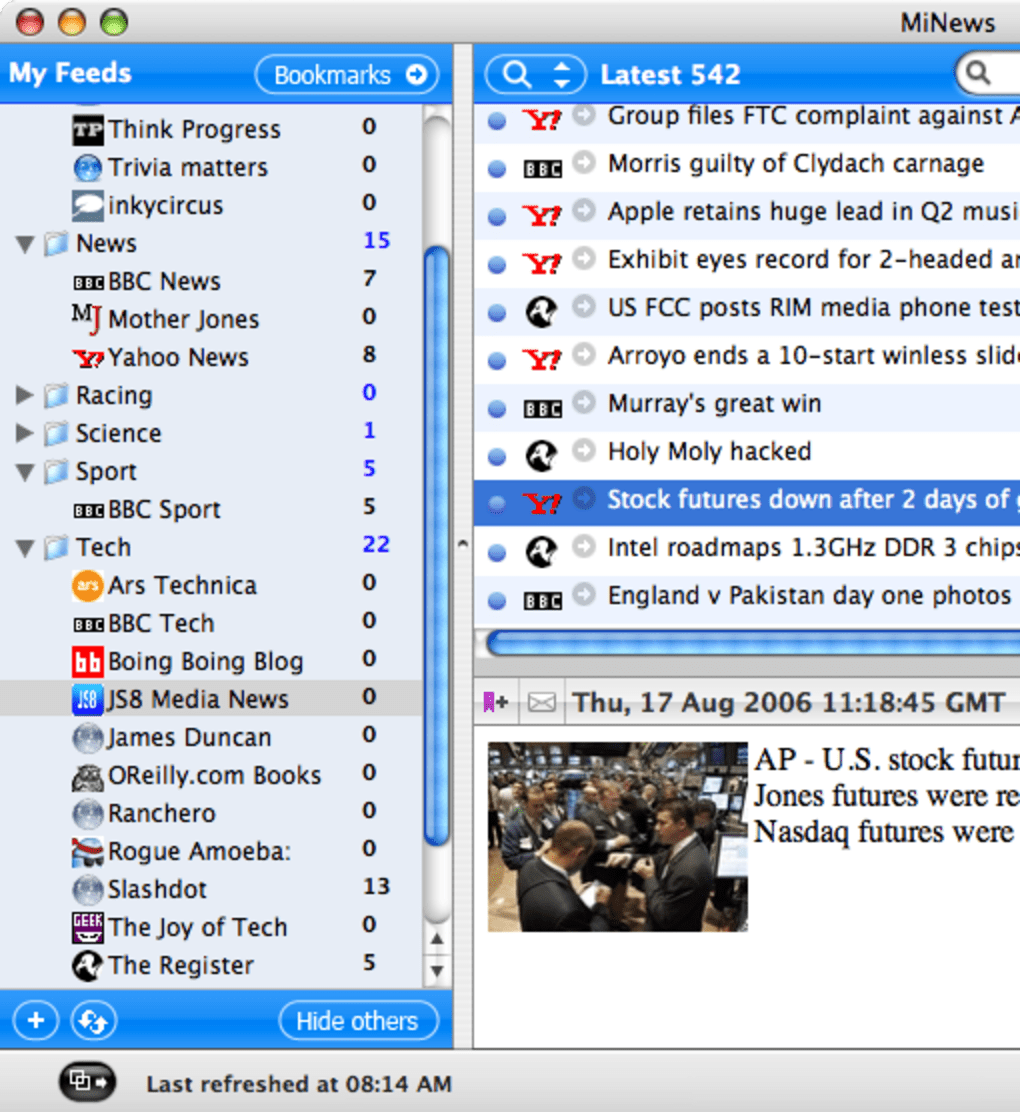
In a world where headlines tumble across the internet at a relentless pace, staying informed without feeling overwhelmed is a challenge most news‑junkies face daily. MiNews steps into that space as a lightweight, desktop‑focused RSS news aggregator that promises to bring order to the chaos. Built with a clean, three‑pane layout, the application displays your feed list on the left, the selected feed’s articles in the central pane, and a concise preview at the bottom.
This design mirrors classic RSS readers, making the transition seamless for anyone accustomed to traditional news aggregators.
What sets MiNews apart is its emphasis on simplicity without sacrificing essential functionality. Adding a new feed is as easy as copying a URL and hitting “Enter,” while the built‑in sorting feature allows you to drag and drop feeds into any order you prefer.
The application automatically checks for updates at configurable intervals, ensuring you never miss a breaking story. Although it doesn’t aim to be a full‑blown newsroom suite, MiNews provides enough tools for everyday readers to curate, sort, and skim headlines quickly.
The user experience remains consistent across platforms, thanks to a responsive UI that adapts to Windows, macOS, Android, and iOS.
While some power users may crave deeper analytics or advanced search capabilities, MiNews focuses on delivering a secure, fast, and free solution for the majority of readers. In the sections that follow, we’ll dive deeper into its feature set, installation process, compatibility, and the pros and cons that help you decide if MiNews is the right RSS reader for your workflow.
Key Features of MiNews
- Intuitive Three‑Pane Layout: Feed list, article view, and preview are neatly organized for rapid navigation.
- Drag‑and‑Drop Sorting: Rearrange feeds in seconds to prioritize the sources that matter most.
- Automatic Updates: Configurable refresh intervals keep your headlines fresh without manual checks.
- Cross‑Platform Support: Available for Windows, macOS, Android, and iOS, with synchronized settings via cloud backup.
- Secure Feed Handling: SSL/TLS support for encrypted RSS/Atom feeds protects your data from interception.
- Customizable Appearance: Light and dark themes cater to different lighting conditions and personal preferences.
- Export & Import: OPML export/import lets you migrate your feed collection effortlessly.
- Compact Preview Pane: Get a quick glimpse of article summaries without opening a full browser window.
- Keyboard Shortcuts: Power users can navigate, refresh, and mark items as read using configurable hotkeys.
- Low System Footprint: Minimal RAM and CPU usage ensures MiNews runs smoothly even on older machines.
How These Features Translate Into Everyday Use
The three‑pane layout isn’t just an aesthetic choice; it mirrors the workflow of seasoned RSS readers, allowing you to scan headlines, open articles, and preview content without juggling multiple windows. Drag‑and‑drop sorting gives you instant control over feed hierarchy, meaning you can push your most trusted sources to the top during a breaking news event and revert later. Automatic updates eliminate the need to click “Refresh” repeatedly, while the ability to set refresh intervals prevents unnecessary bandwidth consumption—a boon for mobile users on limited data plans.
Security is a subtle yet vital feature. By supporting encrypted feeds, MiNews ensures that subscription‑only newsletters or private blogs remain confidential. The cross‑platform design means you can start reading on a Windows desktop at work, continue on a macOS laptop at home, and catch up on an Android phone during your commute, all while keeping your feed list synchronized via cloud backup.
Finally, the low system footprint makes MiNews an ideal companion for users who run multiple productivity tools simultaneously; it won’t hog resources or slow down other applications.
Installation and First‑Time Use Guide
Step‑by‑Step Installation Process
Installing MiNews is straightforward across all supported operating systems. For Windows users, download the .exe installer from the official website, double‑click the file, and follow the on‑screen prompts—accept the license agreement, choose an installation folder (the default works for most), and click “Install.” macOS users will receive a .dmg file; open it, drag the MiNews icon into the Applications folder, and launch it from Launchpad or Spotlight. Android and iOS users can find MiNews in the Google Play Store and Apple App Store respectively; a simple tap on “Install” or “Get” will add the app to your device.
After installation, the first launch presents a welcome wizard that walks you through basic configuration: selecting a default refresh interval (options range from 5 minutes to 1 hour), choosing a theme, and optionally signing in to enable cloud sync. The wizard also offers a quick tutorial that highlights the three‑pane layout, explains how to add a feed, and demonstrates how to use keyboard shortcuts for navigation.
Adding Feeds and Customizing Your Reading Experience
To add a new RSS feed, click the “+” button located at the top of the left‑hand pane or use the shortcut Ctrl + N (⌘ + N on macOS). Paste the feed URL—most news sites provide an RSS icon that links directly to the feed address. MiNews validates the URL, displays a preview of the feed title, and asks you to confirm.
Once added, the feed appears in the list and begins fetching articles based on your chosen refresh schedule.
Sorting feeds is as simple as clicking and dragging any feed entry to a new position. If you prefer alphabetical ordering, right‑click a feed and select “Sort A‑Z.” For deeper organization, you can create custom folders (e.g., “Tech,” “World News,” “Sports”) and drop feeds into them, allowing you to compartmentalize large collections.
The bottom preview pane offers a snippet of the selected article, including the first paragraph and any embedded images—though note that some images may not render correctly on older feed formats, a known limitation addressed in upcoming updates. To read the full article, double‑click the headline or press Enter, which opens the content in a built‑in reader window. If you prefer using your default web browser, you can enable the “Open in browser” option in the settings menu.
Troubleshooting Common Issues
Users occasionally encounter missing images or slow feed updates. The image problem often stems from feeds that embed pictures via HTTP rather than HTTPS; enabling “Load insecure content” in the app’s advanced settings can resolve this, though it may compromise security. For sluggish updates, verify that your refresh interval isn’t set too low, which can cause server throttling. Finally, if the search function opens a new browser window without a preview, you can switch to the “In‑app search” mode in the preferences panel—a hidden feature that provides quick results without leaving the application.
Compatibility, Pros, and Cons
MiNews is built on a cross‑platform framework that ensures native performance on the following operating systems:
- Windows 10, 11 (64‑bit)
- macOS 10.14 Mojave and later
- Android 7.0 Nougat and later
- iOS 12 and later (iPadOS included)
Pros of MiNews
- Free to download and use with no hidden ads.
- Lightweight design that runs smoothly on older hardware.
- Intuitive drag‑and‑drop sorting for instant feed organization.
- Secure handling of encrypted RSS/Atom feeds.
- Cross‑platform availability with cloud sync.
- Customizable themes and keyboard shortcuts for power users.
Cons of MiNews
- Search results open in an external browser and lack an in‑app preview.
- Occasional image rendering issues on feeds using mixed content.
- Missing advanced analytics such as read‑time statistics or tag‑based filtering.
- No built‑in podcast or multimedia player for enclosures.
- Limited customization of notification settings compared to premium RSS apps.
MiNews delivers a solid, no‑frills RSS reading experience that caters well to everyday news consumers. Its lightweight footprint, secure feed handling, and cross‑platform sync make it a standout among free aggregators. While power users may miss deeper search integration and richer analytics, the app’s simplicity and reliability are compelling reasons to download and try it today.
Frequently Asked Questions
Is MiNews completely free or does it contain in‑app purchases?
MiNews is 100 % free to download and use. There are no hidden fees, subscriptions, or in‑app purchases. All core features, including cloud sync and theme selection, are available at no cost.
Can I import my existing OPML file into MiNews?
Yes. From the main menu choose “File → Import → OPML,” select your OPML file, and MiNews will automatically populate your feed list. You can also export your current feeds to OPML for backup or migration.
How does MiNews protect my privacy when syncing feeds?
All synchronization data is transmitted over HTTPS with TLS 1.2 encryption. MiNews does not store the content of individual articles—only the feed URLs and user preferences—ensuring your reading habits remain private.
Why do some images fail to display in the preview pane?
Image issues typically arise when a feed mixes secure (HTTPS) and insecure (HTTP) content. Enabling the “Load insecure content” option in Settings can resolve most cases, though it may reduce security for that specific feed.
Is there a way to receive desktop notifications for new articles?
Yes. In the Preferences panel, navigate to “Notifications” and toggle “Enable desktop alerts.” You can customize which feeds trigger alerts and set a quiet‑hours schedule to avoid interruptions.
Conclusion – Should You Download MiNews?
If you’re searching for a straightforward, secure, and free RSS reader that works across Windows, macOS, Android, and iOS, MiNews is a compelling choice. Its clean three‑pane interface, drag‑and‑drop sorting, and automatic updates streamline the daily news‑reading ritual without demanding a steep learning curve. While the search function could be more integrated and occasional image glitches may appear, these drawbacks are outweighed by the app’s speed, low resource consumption, and robust privacy safeguards.
For casual readers who want to keep tabs on favorite blogs, newsletters, and news sites, MiNews offers everything needed to stay informed. Power users seeking advanced analytics, built‑in podcast support, or highly customizable notification rules may eventually outgrow the platform, but the free tier remains generous enough for most everyday scenarios.
Ready to declutter your browser tabs and bring your feeds onto a single, secure desktop hub?
Download MiNews now and experience a smoother, more organized way to consume the news you love.







